 PS Evolution
How to merge and equip relics in Tribal Wars with PS Evolution
Manage Relics reads the Treasury, merges relics 3 by 3 while keeping the best options, suggests where to equip each one and keeps a history of every action.
It runs in the game's browser session and needs the account connected. The game's "reroll" and "-1 relic" options spend premium points and are not used.
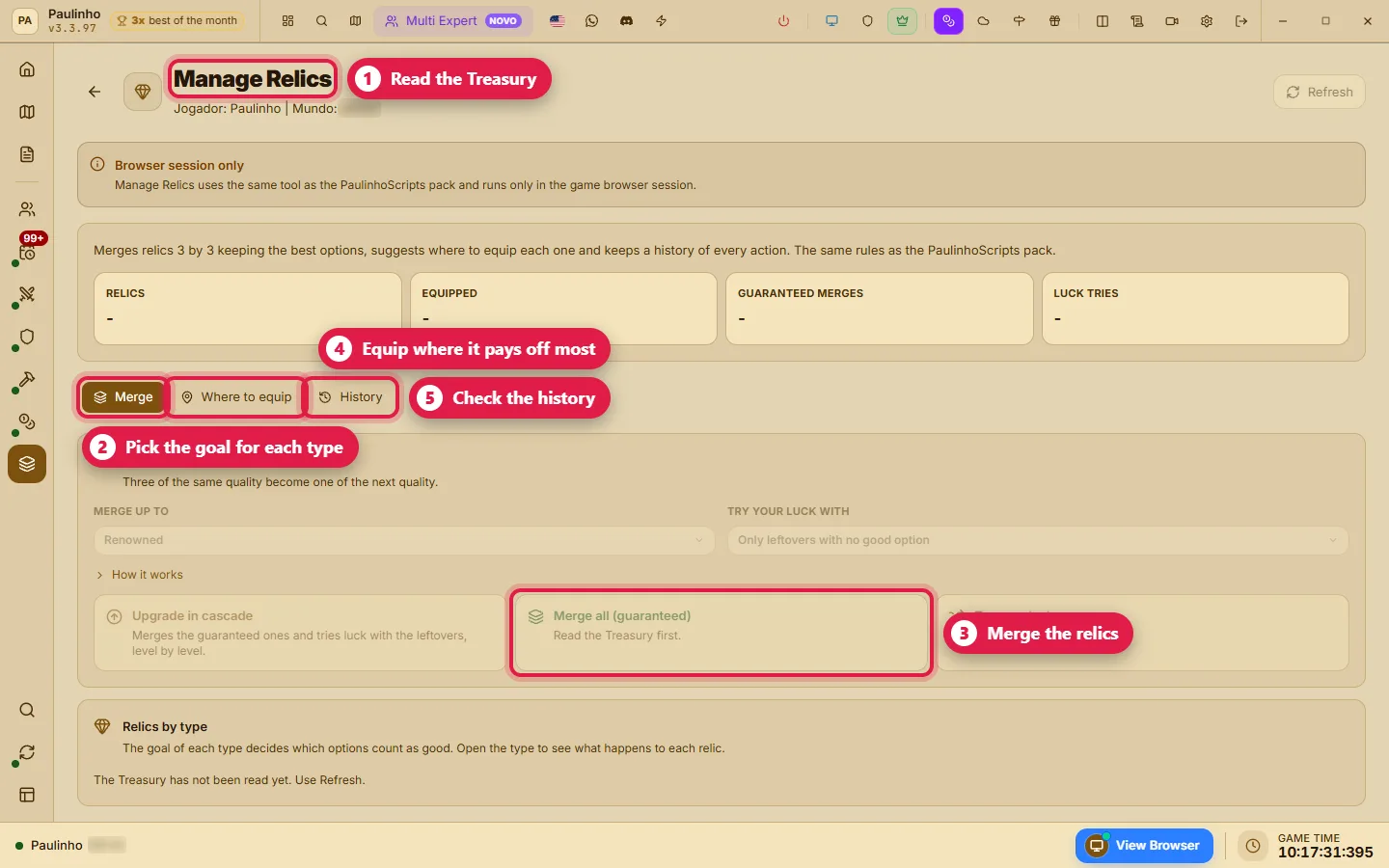
Step by step
-
Read the Treasury
Open Manage Relics and click "Refresh". The top shows how many relics you have, how many are equipped, how many guaranteed merges and how many luck attempts you can make.
-
Pick the goal for each type
On the "Merge" tab, under "Relics by type", the goal (Attack, Defense, Recruitment or Resources) decides which options count as good. Use "Keep" on a relic that must never become material and "Leave out" on one that should not enter the plan.
-
Merge the relics
"Merge all (guaranteed)" merges three of the same type and quality: the main one goes up in quality and keeps both options. "Try your luck" merges three leftovers of different types into a relic drawn by the game. "Upgrade in cascade" repeats both, level by level, up to the quality picked in "Merge up to".
-
Equip where it pays off most
On the "Where to equip" tab, click "Read the villages". The "Suggestion for the free slots" shows each idle relic where it reaches the most villages that don't have the bonus yet. Use "Equip here" on one, or the "Equip the" button, with the number of relics, for all of them at once.
-
Check the history
The "History" tab keeps every merge, luck attempt, equip and removal, with the relic before and after and the material spent. It stays on this computer only.
What each option does
| Option | What it is for |
|---|---|
| Try your luck with | "Only leftovers with no good option" or "Any leftover". |
| Villages that count | An attack relic counts the villages in the "Attack group", a defense relic those in the "Defense group"; the others count every village. |
| Remove marked and Remove all | Remove equipped relics, one at a time. The ones the game still locks for 24 hours stay put. |
| Stop | Interrupts an operation in progress. What was already done stays in the history. |
Tips
- Merge before you equip: the "relic(s) will still be merged" warning means it is worth merging first.
- Equipping locks the relic in the village for 24 hours. Check the suggestion before you confirm.
Common problems
I see "The Treasury has not been read yet".
Click "Refresh" with the account connected.
The run stopped halfway.
Each step is checked in the game, and the run stops at the first refusal or if the inventory changes midway. The message gives the reason; read again and repeat.
I see "The account has a captcha".
Solve the check in the game window and try again.
I can't remove a relic.
The game locks the relic in the village for 24 hours after you equip it. Wait for the time shown in "locked for".
See also
Do not have PS Evolution yet?
The download is free: download it, create your account inside the app and try everything for 24 hours, no card.