 PS Evolution
Tribal Wars support finder: how to send support to many villages at once
The Support Finder (in the menu, "Smart Support") handles defense requests from your tribe or your own villages: you paste the targets, say how much each one needs and when the support should arrive, and the app works out which villages in the group can make it in time, how much leaves from each one and the departure time.
Support can be scheduled to arrive at the exact time or sent right away. Everything that leaves goes into the history, ready to become your reply in the forum defense thread.
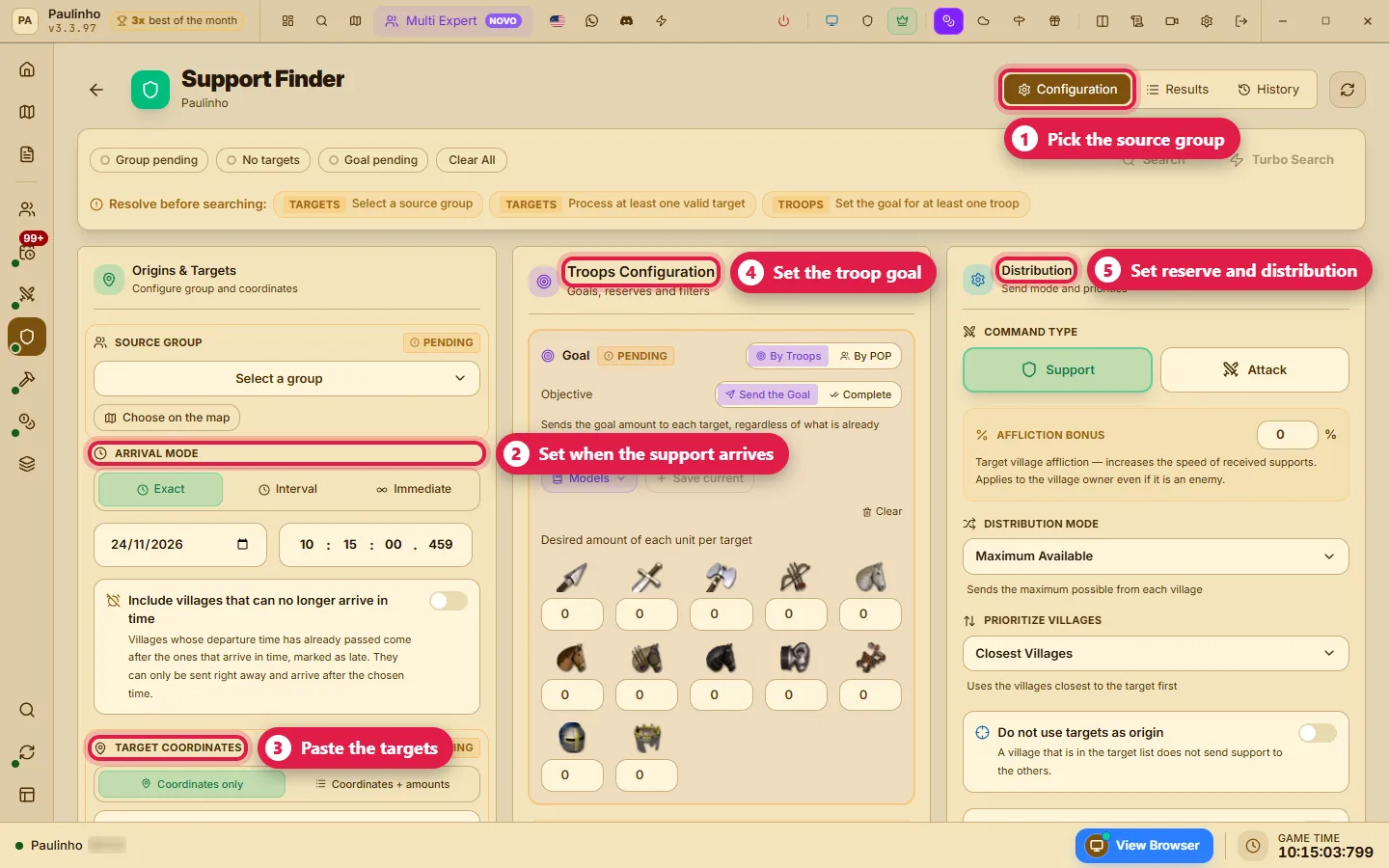
Step by step
-
Pick the source group
On the Configuration tab, under "Origins & Targets", pick the "Source Group": only villages in that game group send support. The top bar shows what is still missing ("Group pending", "No targets", "Goal pending").
-
Set when the support arrives
Under "Arrival Mode", pick "Exact" (one time), "Interval" (from one time to another) or "Immediate" (no date limit, every available village joins).
-
Paste the targets
Under "Target Coordinates", paste the coordinates or the game's village list and click "Process Targets": the app pulls out only the coordinates and validates each one. In the "Coordinates + amounts" format you paste the list from the defense board (e.g. 678|579 - 5000/18600/0) and each line becomes that target's goal.
-
Set the troop goal
Under "Troops Configuration", pick "By Troops" (amount of each unit per target) or "By POP" (population per target, with the units that can be used). Under "Objective", "Send the Goal" sends the full amount; "Complete" reads what is already at the target and what is on the way and sends only what is missing (only works with your own villages).
-
Set reserve and distribution
Fill in the "Reserve" that stays in each village and the "Minimum to Use the Village". Under "Distribution", pick "Maximum Available" or "Fractionate among Villages" (proportional or equal), and the priority: closest or farthest villages.
-
Search for support
Click "Search" to see the full table per target, or "Turbo Search" for a quick summary, better with many targets. The app opens the Results tab with the origins, the duration and each target's progress.
-
Schedule or send
Use "Schedule" so the support leaves at the calculated time and arrives at the chosen time, or "Send now" to leave right away. Before sending now, the app shows how many still arrive in time and how many would arrive late.
What each option does
| Option | What it is for |
|---|---|
| Command Type | Support or Attack. |
| Affliction Bonus | The target village's affliction, which speeds up incoming support. |
| Per-target goal | A different goal for each target. An empty cell uses the global goal. |
| Minimum to Use the Village | The village only joins if it has at least this amount of the unit. It works like a dynamic group. |
| Avoid overlapping departures | Maximum mode only: spaces out departures so two commands never leave at the same instant. |
| Do not use targets as origin | A village on the target list does not send support to the others. |
| Do not use villages with scheduled commands | A village that already has a scheduled command waiting to leave is left out. |
| Include villages that can no longer arrive in time | Also shows the late ones, which can only be sent right away. |
Tips
- Save goals you use often under "Models" ("Save current" button) and apply them with one click on the next request.
- The History tab keeps the support sent by period and builds the reply for the preventive defense thread, even after a new search.
- Scheduled support leaves on time even for players whose plan does not include the Scheduler.
Common problems
The Search button is grayed out.
Clear the pending items shown in the top bar: pick a source group, process at least one valid target and set the goal for at least one troop.
I see "No village can support this target in time".
No village in the group arrives by the chosen time. Pick a later time, use another group, or turn on "Include villages that can no longer arrive in time" to send late.
The group came back with no villages.
Check in the game that the group still exists and has villages, then click "Refresh data".
With "Complete", some targets got the full goal.
The app can only read troops in your own villages. Other players' targets get the full goal, and the app tells you which ones.
See also
Do not have PS Evolution yet?
The download is free: download it, create your account inside the app and try everything for 24 hours, no card.