 PS Evolution
How to withdraw support in Tribal Wars: Manage Supports
Manage Supports lists your troops stationed in other villages and other players' troops stationed in yours, with origin, destination, distance and population. From there you bring back or send back support in bulk.
The tool is marked "Experimental": use it mainly to view, and check the result of the withdrawal in the game before you rely on it.
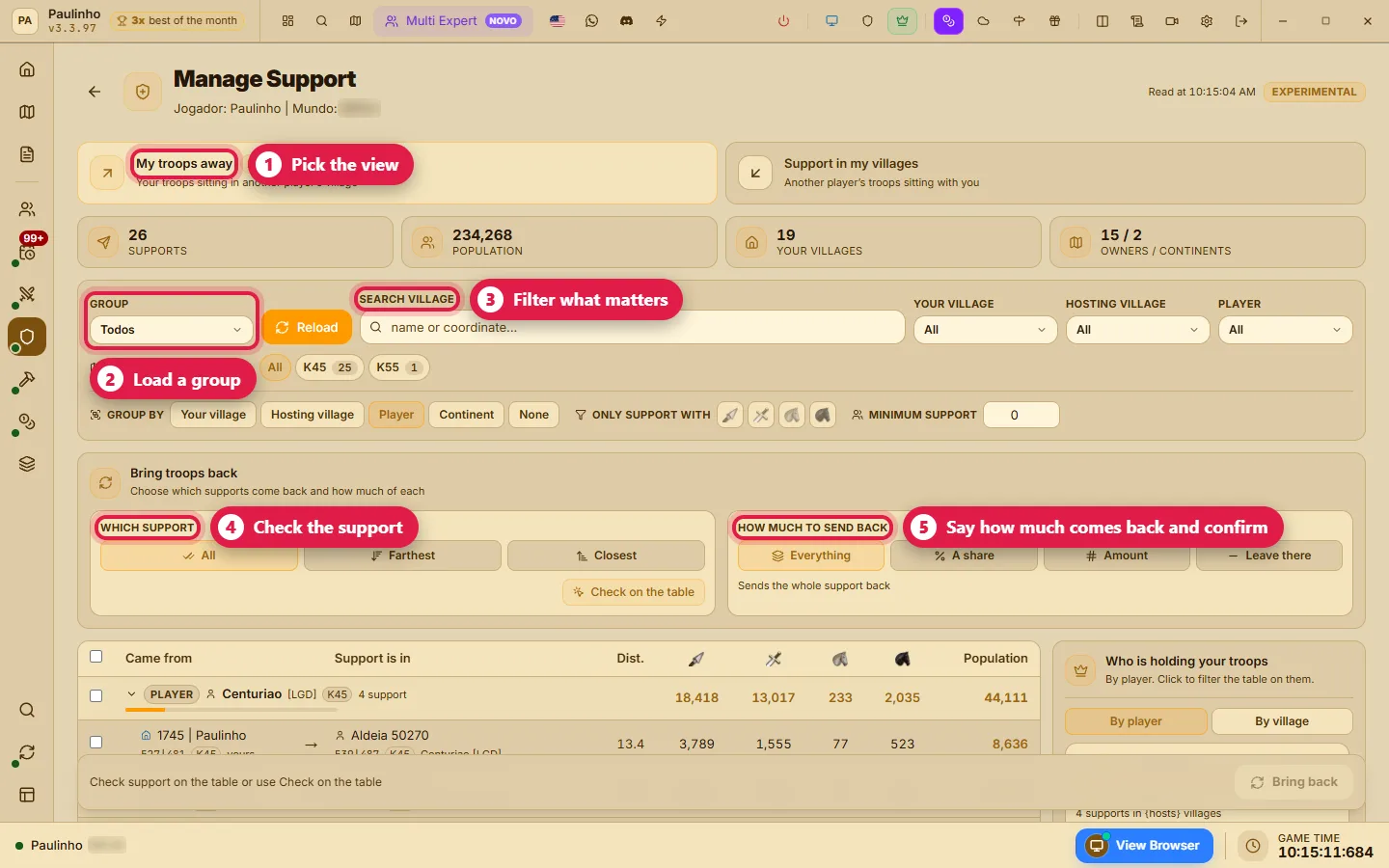
Step by step
-
Pick the view
At the top, pick My troops away (your troops stationed in another player's village) or Support in my villages (another player's troops stationed with you).
-
Load a group
Pick the village "Group": the list loads right away. "Reload" reads it again. The cards show the total support, the population and how many villages and players are involved.
-
Filter what matters
Use "Search village" (name or coordinate), the origin, destination, player and continent filters, "Only support with" (click the units) and "Minimum support" to hide small support. "Group by" groups the table by village, player or continent.
-
Check the support
Check the rows in the table or use "Which support": "All", "Farthest" or "Closest", with the amount, and click "Check on the table". The side panel shows who supports the most; clicking a row filters the table.
-
Say how much comes back and confirm
Under "How much to send back", pick "Everything", "A share" (percentage), "How many" (of each unit) or "Leave there" (the given amount keeps supporting and the rest comes back). Click "Bring back" or "Send support back" and confirm.
Tips
- Another player's support always goes back whole: the game does not let you send back only part of someone else's support.
- "Farthest" is the quick way to bring back the troops that would take the longest to return and defend your area.
Common problems
I see "Could not load the supports".
The reason shows right below the warning. Check that the account is connected and click "Reload".
I chose to send back a share, but the support went back whole.
In the "Support in my villages" view, sending back another player's troops goes through the game's form and is always whole.
Some support failed to go back.
The final summary shows how many worked and how many failed. Reload the list and check in the game before trying again.
See also
Do not have PS Evolution yet?
The download is free: download it, create your account inside the app and try everything for 24 hours, no card.