 PS Evolution
Mint coins automatically in Tribal Wars (and store resources)
The Minting Hub mints gold coins in the academy for you: by renewing the game's own automatic minting, minting village by village, in bulk across a group, or only when the warehouse fills up.
Some worlds don't mint coins: the academy stores resource packages instead. The app checks this in the game's own settings and switches the screen to "Store Resources". Those worlds have no Auto TW, but everything else works. The account session must be connected.
Step by step
-
Check the world type
When it opens, the app shows whether it is a coin world or a "Reserve world". If the game's academy shows Store instead of Mint, click "Check again".
-
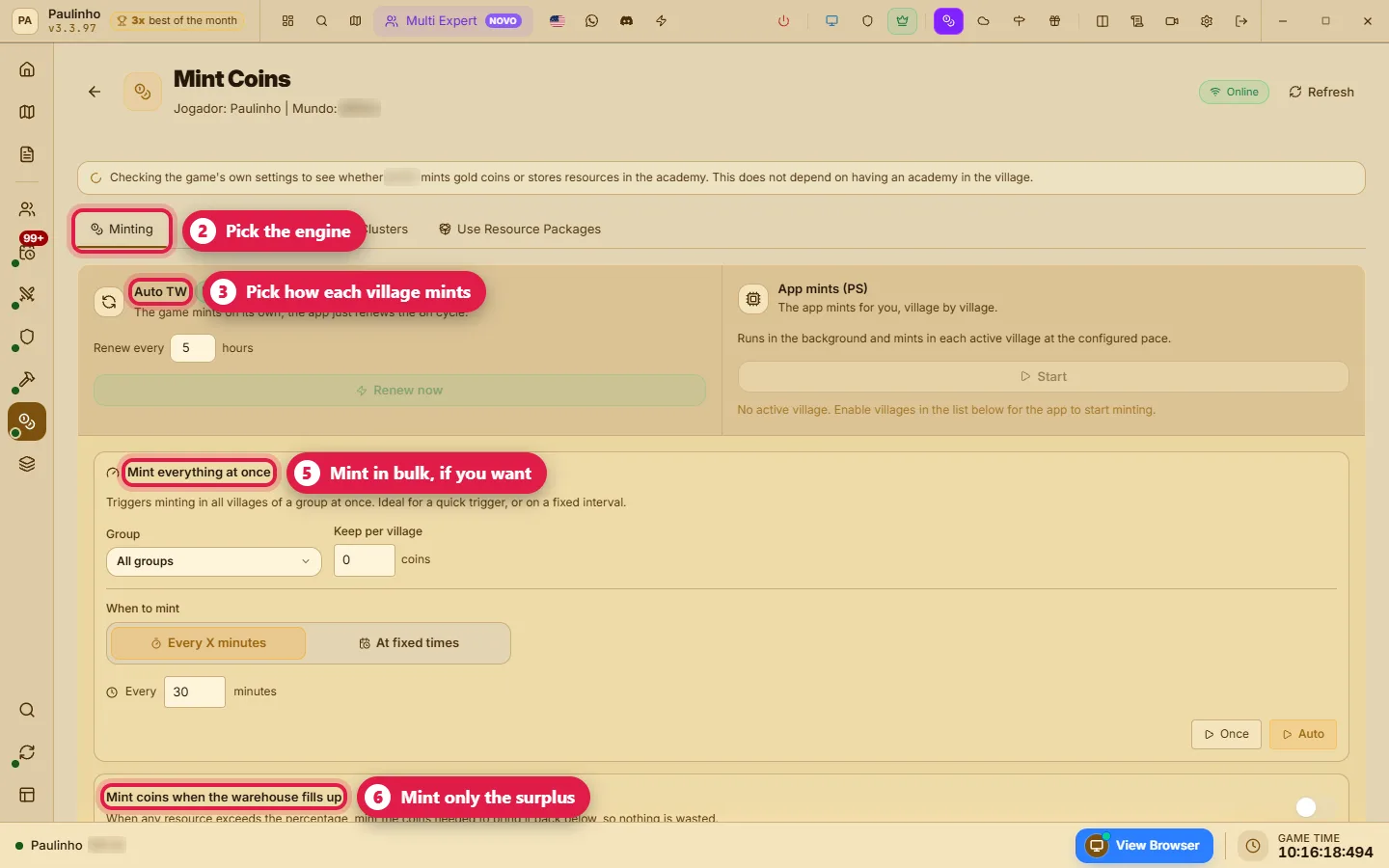
Pick the engine
On the "Minting" tab, "Auto TW" (recommended on coin worlds) lets the game mint on its own every 8 hours, and the app only renews that cycle before it expires; set "Renew every" (1 to 8 hours, 3 to 6 suggested). "App mints (PS)" mints in each active village at its own pace: click "Start".
-
Pick how each village mints
In the village list, open the village and choose under "How will this village mint?": "Auto TW", "App (PS)" or "Don't mint". "Advanced options" holds the minimum and maximum coins, reserved coins and the interval.
-
Pull resources to the minting village
In the same window, "Request resources from other villages" makes the village pull from a source group, with max distance, interval and reserve. "Coin cost" mode arrives with wood, clay and iron balanced; "Proportional" pulls everything above the reserve. In the "Donor villages" card, check which villages can donate.
-
Mint in bulk, if you want
Under "Mint everything at once", pick the group and how many coins to keep per village. Under "When to mint", pick "Every X minutes" or "At fixed times" (game clock or PC clock). Click "Once" or turn on "Automatic".
-
Mint only the surplus
Turn on "Mint coins when the warehouse fills up" and set the "Excess percentage:" (default 90%). When any resource goes above the percentage, the app mints just enough to bring it back below. "Mint excess now" checks right away.
What each option does
| Option | What it is for |
|---|---|
| Renew now | Renews the Auto TW 8 hour cycle in every active village. |
| Disable on all | Turns Auto TW off in every village, after confirmation. |
| Captcha Alert | Plays a sound when the game asks for a captcha during minting. |
| Use Resource Packages | Tab that uses the packages in your inventory to fill the warehouse up to the target, allowing a few villages to go past the margin. It has "Evaluate now", "Use packages now" and an automatic mode. |
| Resource Sending and Clusters | Tabs to send resources to destinations and to set up groups of a central village and satellites. See the resource sending tutorial. |
Tips
- With fixed times, if the app is closed at the scheduled time, it mints as soon as it is back, as long as it is within 1 hour.
- Every surplus check goes into the account's Action Log, with how many villages were read and how full the fullest warehouse is.
Common problems
"Mint excess now" minted nothing.
No village went above the percentage. The screen shows how full the fullest warehouse is; lower the percentage if you want to mint earlier.
Auto TW shows as "Blocked by the game".
It is a reserve world: without gold coins there is no automatic 8 hour cycle. Use the app's engine ("App stores").
The screen talks about coins, but the world stores resources.
Click "Check again" with the account connected. The reading comes from the game's own settings and doesn't depend on having an academy in the village.
Resource requests bring nothing.
Check the "Donor villages" card: with no village checked, the requests bring no resources at all.
See also
Do not have PS Evolution yet?
The download is free: download it, create your account inside the app and try everything for 24 hours, no card.