 PS Evolution
How to balance resources between villages in Tribal Wars automatically
The Balancer redistributes resources between your villages by sending merchants automatically. Large or full villages send their surplus and small ones receive up to the set limit.
The tool requires an active Premium Account in the game: without it, you can configure the screen but it won't turn on. The account session must be connected.
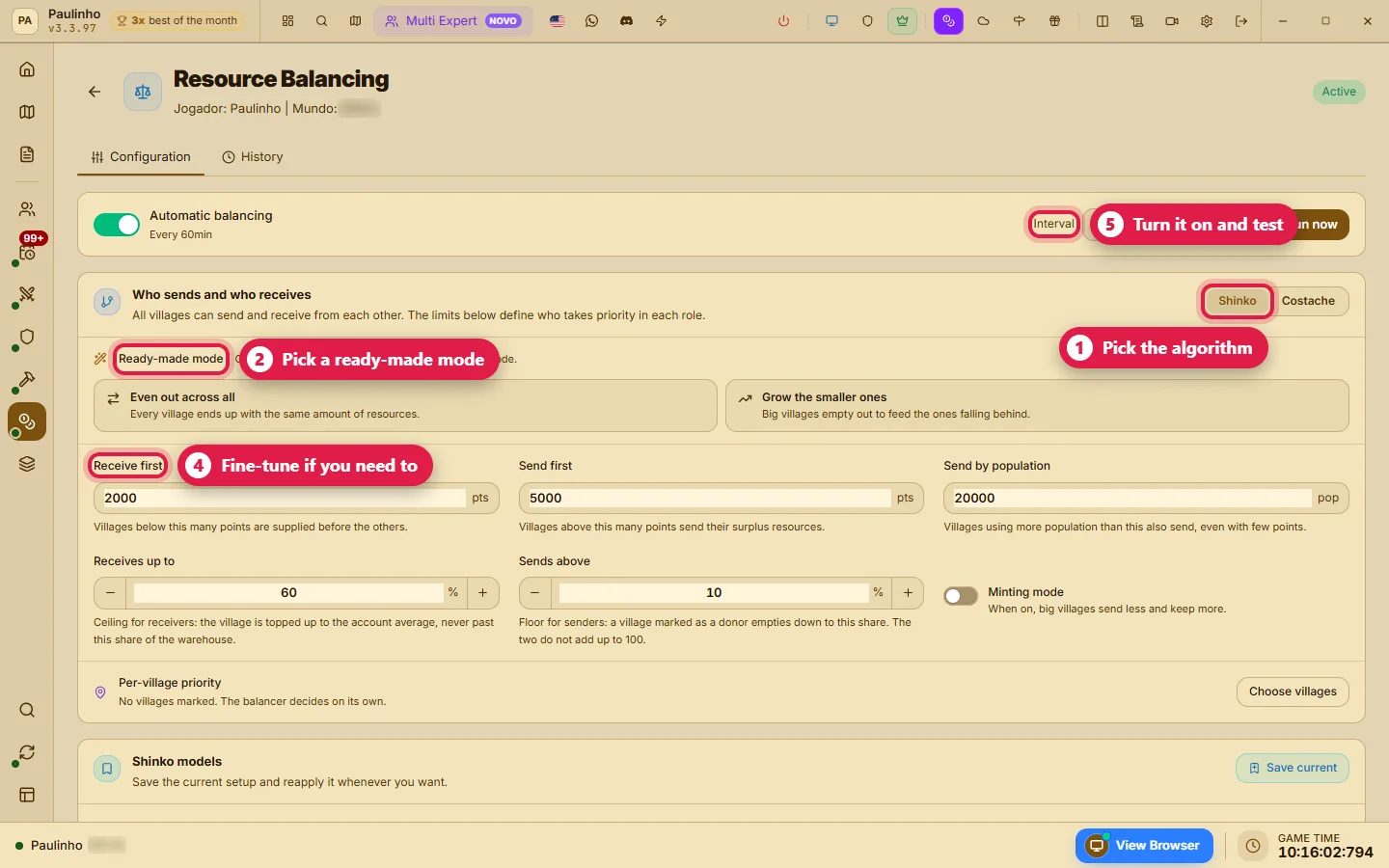
Step by step
-
Pick the algorithm
Under "Distribution algorithm", pick Shinko (distributes by points and farm; simple and fast, ideal day to day) or Costache (groups by proximity and optimizes distance and CC; for large accounts).
-
Pick a ready-made mode
Under "Ready-made mode", "Even out across all" leaves every village with the same amount of resources. "Grow the smaller ones" makes large villages empty out to support the ones falling behind. The fields adjust on their own.
-
Check the preview with your villages
Under "Live preview of your villages", click "Load preview". The app shows who would send, who would receive and who stays unchanged with the current limits.
-
Fine-tune if you need to
In Shinko, adjust "Receive first" (points), "Send first" (points), "Send by population", "Receives up to" and "Sends above". In Costache, adjust "Aggressiveness", "Regions", reserved merchants and "Guaranteed construction".
-
Turn it on and test
Turn on "Enable balancing", set the "Interval" (default 60 minutes) and use "Run now" for an immediate cycle. The "History" tab shows what was moved.
What each option does
| Option | What it is for |
|---|---|
| Receive first | Villages with fewer points than this are supplied before the others (Shinko; default 2,000). |
| Send first | Villages with more points than this send their surplus (Shinko; default 5,000). |
| Send by population | Villages with used population above this also send, even with few points (Shinko; default 20,000). |
| Receives up to / Sends above | Ceiling for receivers and floor for senders, as a share of the warehouse. The two don't add up to 100. |
| Minting mode | When on, large villages send less and keep more. It only matters with small warehouse villages; leaving it off is recommended. |
| Aggressiveness (Costache) | 0% moves only the essentials; 100% evens out every village. |
| Regions (Costache) | 1 balances all villages together; 2 or more splits them by proximity, with shorter trips. |
| Guaranteed construction (Costache) | Hours of resources kept so the CC queue keeps building. Requires an active CC. |
| Per-village priority | Optional: forces a village to always "Receive", always "Send" or stay out ("Ignore"). |
| Presets | Save the current settings with "Save current" and reapply them whenever you want. |
Tips
- "Suggestion based on your account" works out limits from your villages' points and population. It is experimental: check the values before clicking "Apply".
- On a large account, a cycle can take a few minutes. If another tool is using the account, "Run now" waits its turn.
Common problems
The switch won't turn on and I see "Premium Account required".
The Balancer only runs with an active Premium Account in the game. Activate it and click "Check again".
I clicked "Run now" and nothing happened.
When the tool cannot run (captcha open, session down, account busy or already queued), the screen shows the reason. Fix it and try again.
Almost nothing was sent.
With low aggressiveness, villages barely trade resources. Raise the aggressiveness or use the "Even out across all" mode.
See also
Do not have PS Evolution yet?
The download is free: download it, create your account inside the app and try everything for 24 hours, no card.