 PS Evolution
How to train your paladin automatically in Tribal Wars
Train Paladins takes care of the paladins in your Statue. For each checked paladin, the app first educates (learns the skills in the plan, spending whatever books and skill points you have) and then trains, whenever the paladin is home, below level 30 and with resources in its village.
The app never touches unchecked paladins. Paladins only show up once you have a Statue in the game.
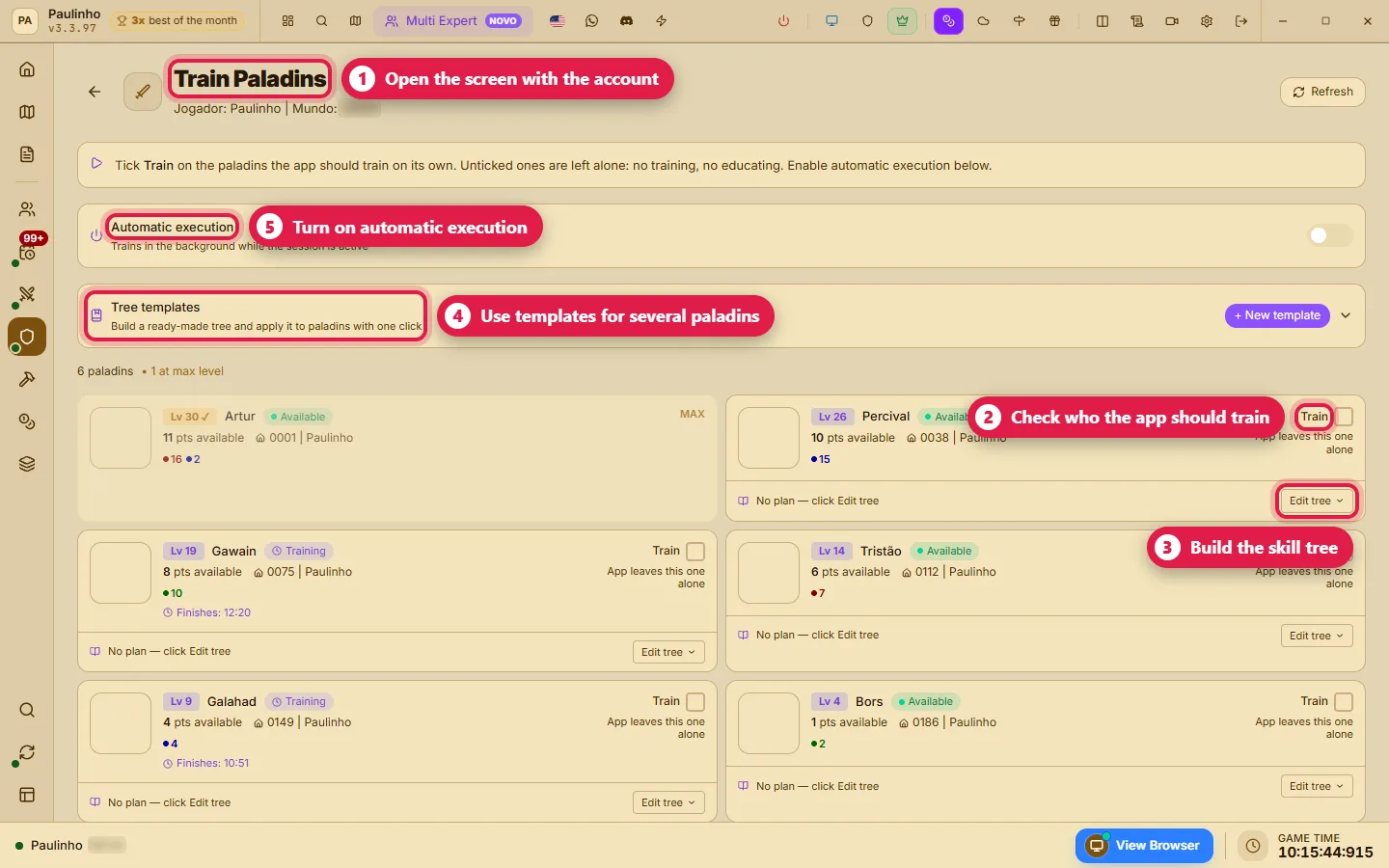
Step by step
-
Open the screen with the account connected
Go to Train Paladins. The app reads your paladins, the status of each one (Available, Training, Recruiting, Busy) and the Statue's books. "Refresh" reads them again.
-
Check who the app should train
Check "Train" on the paladins the app should train and educate on its own. The selection is saved right away.
-
Build the skill tree
Click "Edit tree" and, on each skill, click the level it should reach. The dash resets the skill in the plan. The screen warns you about what is locked: missing book, skill point, paladin level or previous skill.
-
Use templates for several paladins
Under "Tree templates", click "New template", build a tree (e.g. Offensive, Defensive) and save it. Then apply the template to one paladin or to the selected ones with one click.
-
Turn on automatic execution
Turn on "Automatic execution" and set the "Interval between runs", from 5 to 240 minutes (30 by default). Training runs in the background while the session is active.
Tips
- Books belong to the whole account: the app spends them in the order the Statue lists the paladins.
- A paladin that is training, being recruited or reviving gets no study request; it joins on the next pass.
Common problems
I see "No paladins found".
Build a Statue in the game to recruit paladins and click "Refresh".
The app isn't training a paladin.
Check that it is checked under "Train", that it is home, below level 30, and that its village has the resources for training.
It says it couldn't read the Statue's books.
Build the plan as usual: educating runs as soon as reading works again. Click "Refresh".
See also
Do not have PS Evolution yet?
The download is free: download it, create your account inside the app and try everything for 24 hours, no card.