 PS Evolution
How to get free days on PS Evolution by referring friends
In the referral program, you share a link and earn license days when your friend creates an account and confirms the email, and more days when they buy. Whoever joins through your link gets an automatic 10% discount on their first purchase.
The program is for customers who already have a license: after your first purchase, your code shows up on the screen.
Step by step
-
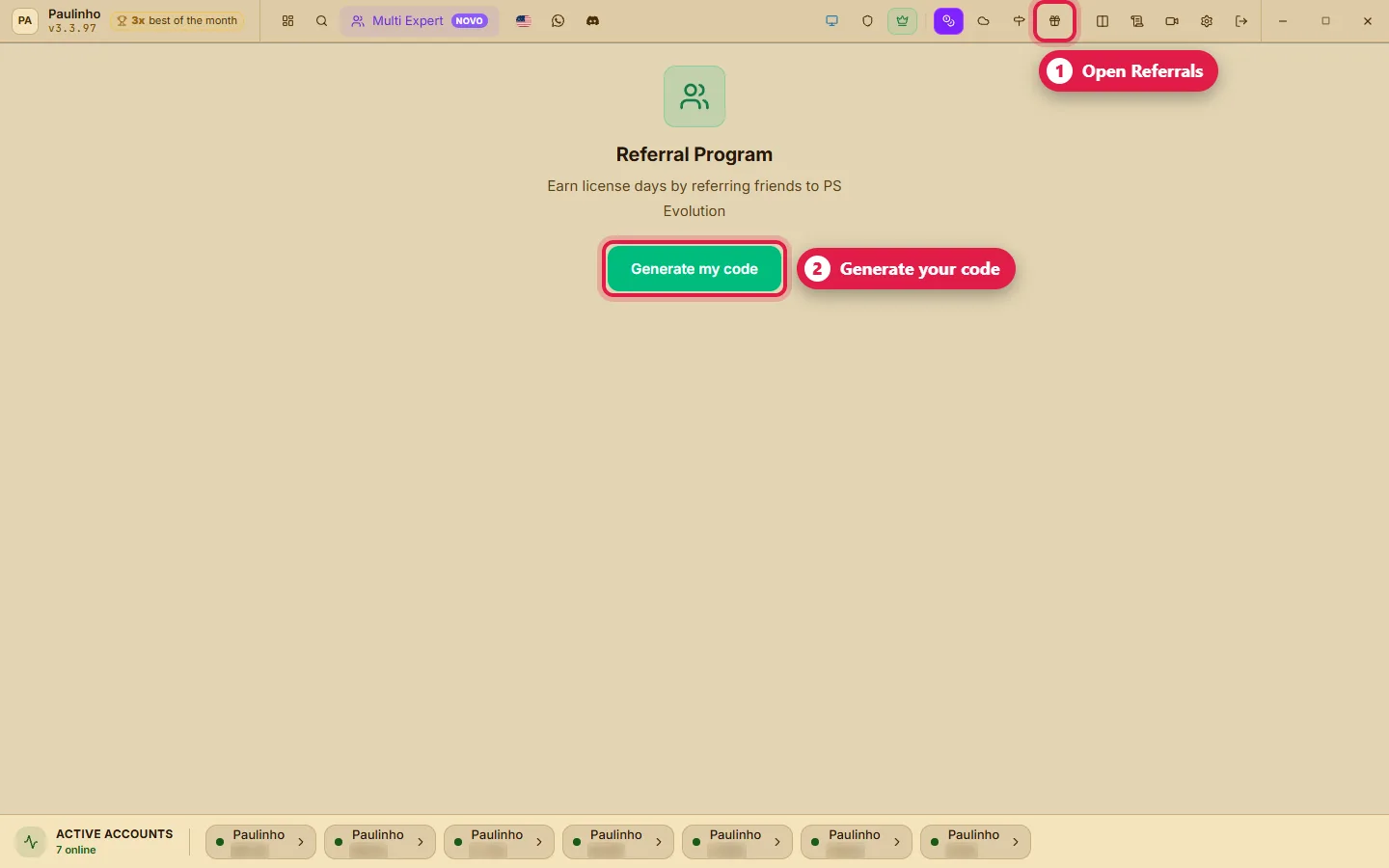
Open Referrals
Click Referrals (gift icon) in the top bar.
-
Generate your code
The first time, click Generate my code. Your referral code and link show up under "Your code".
-
Share it
Click Copy message to share: the message comes ready, with your link built in. Paste it in your tribe's chat. If you prefer, use "Copy link".
-
Follow your referrals
Under "Your Referrals", see each friend with date, plan, status and bonus. The totals show "Total Referrals", "Active", "Days Earned" and "To Receive".
-
Request the tribe discount
Under "Tribe discount", click "Request tribe discount" and enter the tribe name, world, number of members and WhatsApp. Once approved, you get a coupon for the members to use when they buy.
What each option does
| Option | What it is for |
|---|---|
| Friend confirms the email | You earn license days as soon as they confirm the email (or when they buy a plan). |
| Friend buys | On your referral's first purchase, your reward goes up. On each of their future renewals, you earn again. |
| Monthly ranking | Whoever brings the most friends with an active license in the month earns premium points. The ranking resets every month. |
| Tribe discount | The more tribe members with a license, the bigger the discount for everyone. It starts at a minimum number of members and is unlocked after a review. |
| Cash commission | Partner referrers can swap days for a commission in Brazilian reais, withdrawable through PIX. The screen shows how much is left to unlock it. |
Tips
- Whoever joins through your link is tied to you and gets the discount without typing anything. The code can also be typed in at sign-up.
Common problems
I see "The referral program is for customers who already have a license".
The code is only generated after your first purchase. Buy a plan and come back to the screen.
My referral shows as "Awaiting email".
They have not confirmed the email yet. The sign-up days come in as soon as they confirm, or when they buy a plan.
See also
Do not have PS Evolution yet?
The download is free: download it, create your account inside the app and try everything for 24 hours, no card.