 PS Evolution
How to use PS Evolution on two computers (Online Mode)
With Online Mode on, your accounts, settings and commands stay the same on all your computers. One of them is the Main computer: it is the one that runs the accounts. On the others you follow along and configure, and nothing goes out twice.
Online Mode is also what lets the links in the captcha alert (solve on your phone and "I solved it") reach the account.
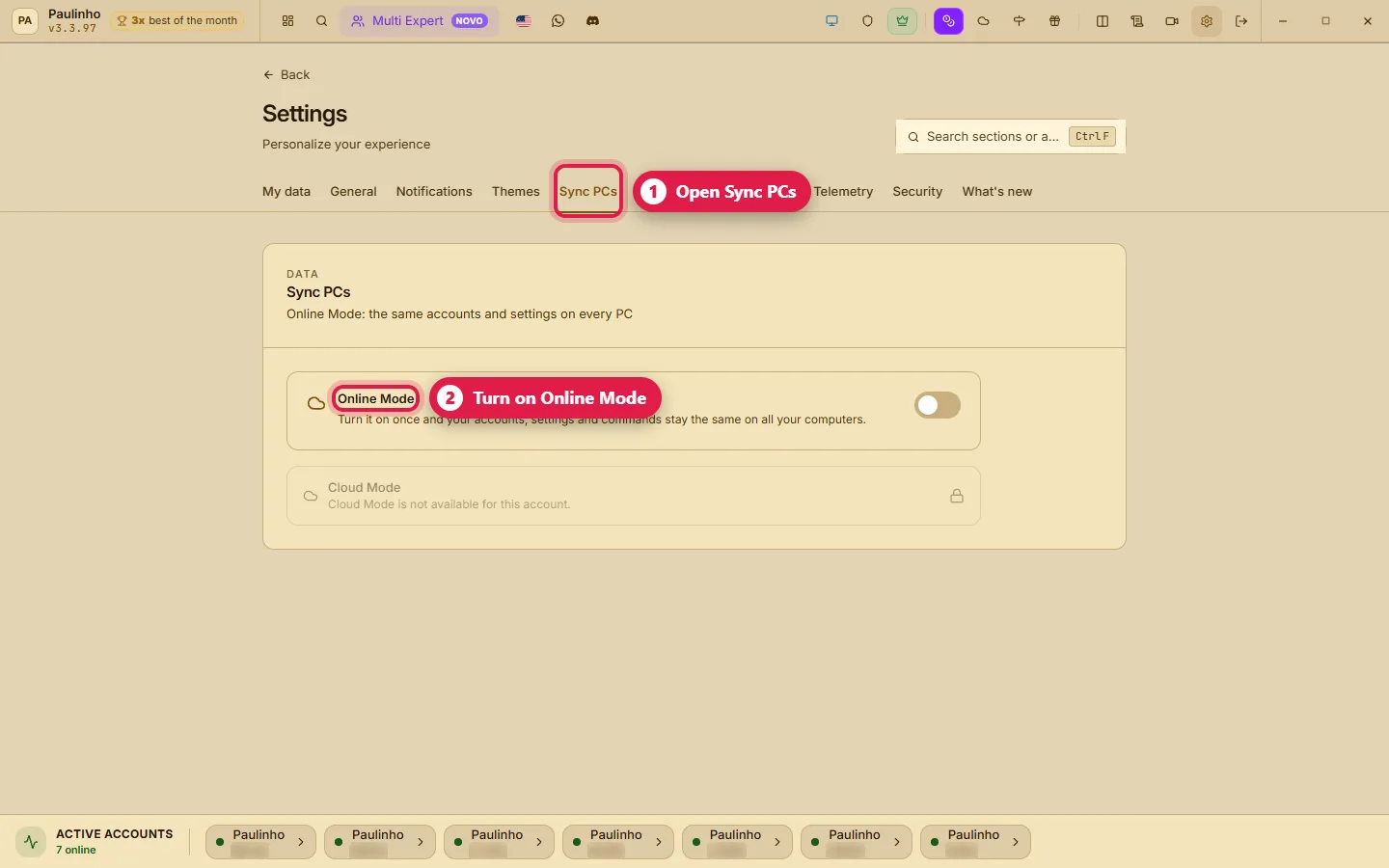
Step by step
-
Open Sync PCs
Click the gear icon in the top bar and, under "Data", click Sync PCs.
-
Turn on Online Mode
On the "Online Mode" card, click the switch ("Turn on Online Mode"). If no computer is running the accounts, this one takes over: you see "This computer is the Main one: your accounts run here."
-
Sign in on the second computer
Install PS Evolution on the other PC and sign in with the same login. The accounts and settings show up there. The card shows which computer is the Main one ("... is the Main computer: your accounts run there.") and this PC only follows along and configures.
-
Change the Main computer
Want the accounts to run on the computer you are on? Click Run on this computer. The other one stops running them and only follows along.
-
See what changed and where
With Online Mode on, the app records changes in "Change history": what changed, on which computer and when, with filters for Settings, Runner, Sync and Account. To open it, press
Ctrl+Kand search for "Change history".
Tips
- Online Mode applies to all your computers: turn it on in one and it is on in all of them.
- Turning Online Mode off deletes nothing: each computer keeps what it has and stops syncing.
Common problems
I see "No computer is running your accounts right now."
No PC took over the accounts, so nothing runs. Click "Run on this computer" on the PC that should do the work.
My commands went out twice.
This happens when two computers run the same account with Online Mode off. Turn Online Mode on: only the Main computer runs the accounts.
The captcha alert says the links may not reach the account.
The account's computer has Online Mode off. Turn it on under Settings > Sync PCs; the Notifications screen itself has the "Open Sync PCs" button.
See also
Do not have PS Evolution yet?
The download is free: download it, create your account inside the app and try everything for 24 hours, no card.